Electricity bills often become a source of stress when payment deadlines approach and systems feel confusing. In daily life, people want fast, safe, and simple ways to manage their household expenses. The challenge usually appears when users try LESCO bill payment online but face uncertainty about methods, status updates, or confirmation delays. So, here you will learn step-by-step methods to pay bills online using popular banking apps, mobile wallets, verify their paid status, security practices, and troubleshooting issues.
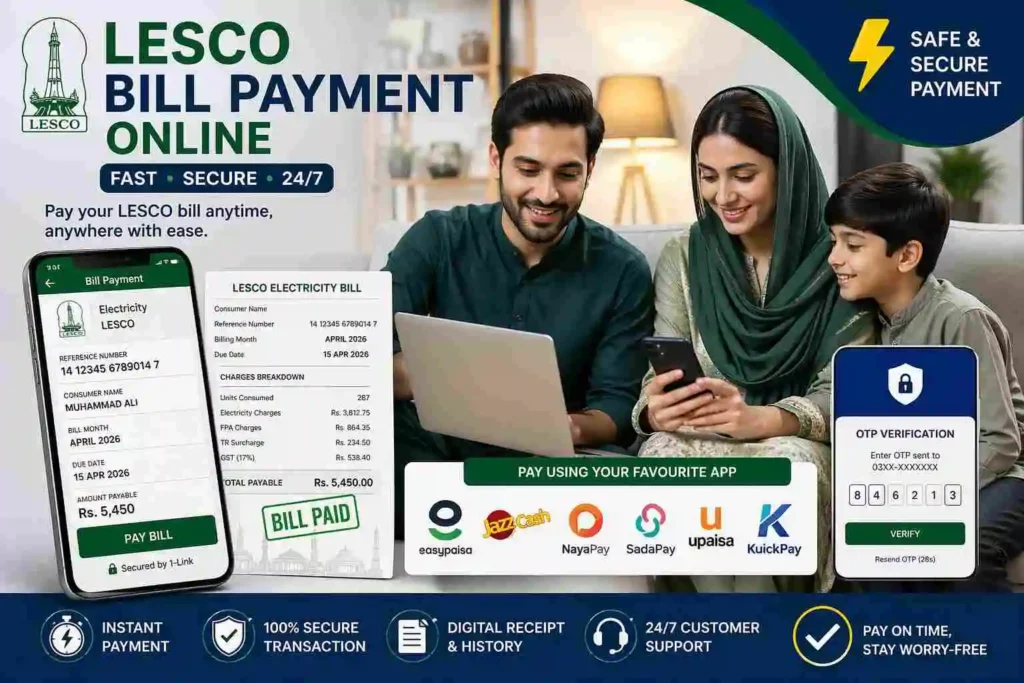
Online LESCO Bill Payment Options:
You can use any of these online bill payment options:
Online Banking (Web Portals):
Most major commercial banks like HBL, UBL, ABL, and Meezan offer robust internet banking interfaces. By logging into your desktop portal, you can add your reference number as a Bill Payee. This method is ideal for business owners who require detailed e-statements and downloadable transaction certificates for tax reconciliation.
Mobile Banking Apps:
Bank mobile applications like myABL (Allied Bank), HBL Mobile, NBP, or Alfalah Alpha offer the fastest route to pay LESCO bill online. These apps utilize API integration with the PITC database to fetch your live arrears. Once you enter your account details, they display the consumer details to ensure you never pay the wrong account.
LESCO Official Website:
While the www.lesco.gov.pk portal is primarily a diagnostic tool for generating duplicate bills, it also provides links to partner banking sites. It serves as the source of truth for verifying your current billing cycle and downloading the official tax-invoice PDF before proceeding to your chosen payment app.
LESCO Light Mobile App:
Beyond just payments, LESCO Light application allows you to view your load shedding schedule, track previous consumption history, and even register complaints regarding voltage fluctuations or transformer issues directly with your local sub-division.
Best Mobile Wallet Apps for LESCO Bill Payment:
Fintech wallets have revolutionized utility management by offering instant cashback and 24/7 accessibility.
Easypaisa:
The most widely used platform for Telenor Microfinance Bank users. It allows for one-tap payments and provides an instant digital receipt that is legally recognized. So, create a free account, go to the electricity option under the utility bill section, and pay your bill.
JazzCash:
Owned by Mobilink Microfinance Bank, this wallet is excellent for those in rural areas of the Lahore electric supply company region (like Okara or Kasur) who may not have a formal bank account but need to settle dues via a mobile shop.
NayaPay:
A modern Electronic Money Institution (EMI) that offers a sleek interface for younger consumers. It’s particularly useful for those who want to use a virtual Visa card to track their utility expenses.
SadaPay:
Known for its simplicity, it allows you to pay your Lahore Electric bill via debit card or wallet balance without any hidden service charges, providing a transparent breakdown of your transaction.
Upaisa:
The Ufone/PTCL digital wallet is a reliable alternative that ensures your payment status is updated on the LESCO servers with minimal latency.
Kuickpay:
A specialized payment aggregator that facilitates secure transfers between your bank and the utility company, often used as the backend processor for many corporate payment portals. It offers flexibility for both online and offline users.
For offline users, bank branches, post offices, and authorized retailers also accept LESCO payments.
How to Pay LESCO Bill Online? (Step-by-Step Guide)
To secure a seamless transaction and avoid payment reversals, follow this optimized workflow designed for the latest banking and fintech apps.
Step 1: Extract Reference Number:
Locate your LESCO reference number from the top section of your previous bill. This unique ID links your payment directly with your electricity connection in the LESCO database.
Step 2: Check and Verify Your Bill:
Before proceeding to payment, check your LESCO duplicate bill online via the official PITC portal with information about the payable amount and due date.
Step 3: Select Your Preferred Payment Channel:
Choosing an integrated mobile banking app (like Allied Bank, HBL, or Meezan) or a digital wallet (such as JazzCash or EasyPaisa). Go to the Utility Bill Payments module and select Electricity followed by LESCO.
Step 4: Validate Consumer Data:
Input your reference number and verify the fetched Consumer Name and Due Date by cross-checking it with your records.
Step 5: Pay Bill:
Click the pay bill button.
Step 6: Authorize the Payment:
Finally, complete the OTP (One-Time Password) or biometric authentication (fingerprint or face ID).
Step 7: Archive Your Digital Receipt:
Once finalized, download the digital receipt or take a screenshot as legal proof of payment until your paid status is updated on the LESCO Light app.
💡 Pro Tip: Always double-check your reference number and bill amount before confirming, as LESCO payments are processed instantly and cannot be reversed once submitted.
How to Check LESCO Bill Paid Status?
It’s important to confirm that your electricity bill payment has been successfully received and updated in the system to prevent disconnection and arrears that appear in the next billing cycle with 10% late surcharge. You can view it by:
💡 If your payment is deducted but not updated within 24 hours, contact LESCO helpline or your bank support with the transaction ID for quick resolution
Security Measures & Tips for Safe LESCO Online Bill Payment:
Follow these security practices during digital transactions :
Why Pay LESCO Bill Online?
Paying your electricity bill online is a strategic move for modern financial management. Some key benefits includes:
Troubleshooting Common Bill Payment Issues:
You may encounter the following roadblocks while settling your Lahore Electric Supply Company dues:
Payment Failed but Amount Deducted:
Wait for reversal (usually 24–48 hours) or contact your bank or wallet support.
Duplicate Payment Errors:
Extra amount is auto-adjusted as credit in your next bill.
OTP or PIN Issues:
Ensure your registered mobile number is active to receive secure authentication codes.
New Connection Not Found:
Recently issued meters may take time to appear in the LESCO billing system.
Online Installment Limitation:
Bills approved for installments by LESCO may not work on apps; pay via NBP or BOP branch for proper record.
Expired Due Date:
Some banking apps block late bills; generate a revised bill with Late Payment Surcharge (LPS) before paying.
LESCO Bill Payment Issue Resolution Channels:
For any payment issues, discrepancies, or failed transactions, users can quickly get help from:
Frequently Asked Questions (FAQs):
Final Thought:
Paying and managing your LESCO bill online through PITC-linked banking systems, mobile wallets, and the official LESCO Light app ensures fast, secure, and transparent electricity bill handling with instant verification, digital receipts, and 24/7 access to billing records across Lahore Electric Supply Company service areas.