When you are building a new home or shifting to a new property, you may face delays or confusing steps while applying for a new electric meter connection. That’s why Lahore Electric Supply Company digitized its process via ENC, but it often feels like a bureaucratic maze for an average consumer. The main challenge lies in proper document submission, system verification, and the Demand Notice fee submission. This article explains the complete ENC procedure, i.e., online payment methods, requirements and shares practical solutions to speed up LESCO new connection approval and meter installation.
How to Apply for LESCO New Connection Online? (Complete Step-by-Step Guide)
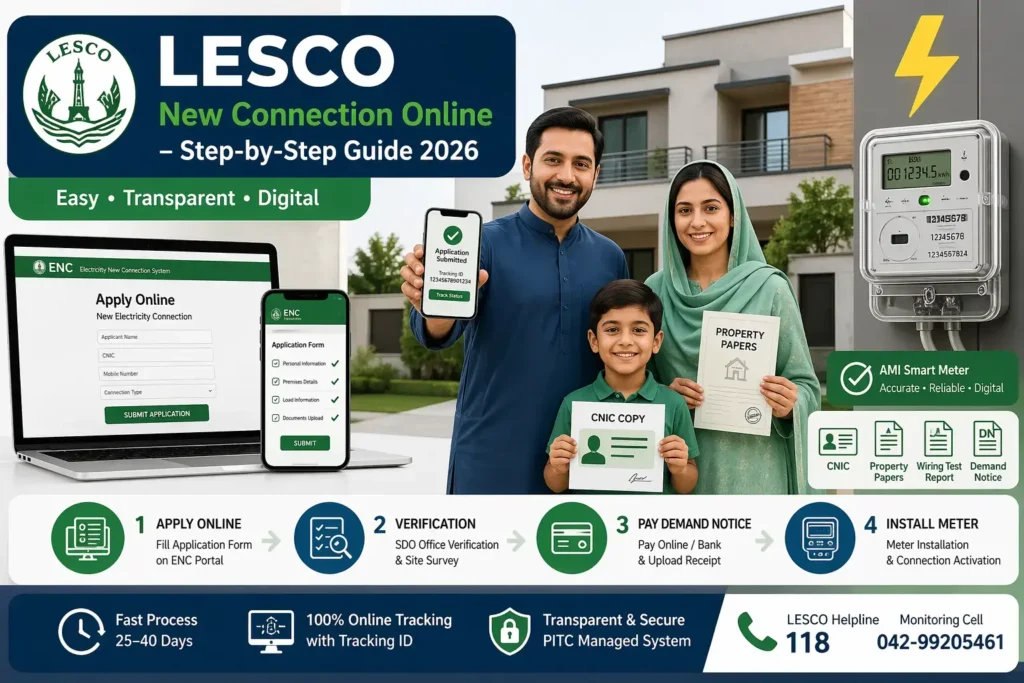
It’s now fully digital to install a new smart electric meter from LESCO (Lahore Electric Supply Company) through the Electricity New Connection System (ENC) portal managed by PITC. Carefully follow this simple installation procedure to avoid delays.
Step 1: Accessing the Official ENC Portal:
Navigate to the official ENC portal (enc.com.pk). Choose the Apply option located within the right-hand navigation panel.
Step 2: Fill Application Form:
For a new electricity connection, fill out this online form with accurate information to activate the meter quickly.
Subdivision Information:
Finalize Applicant Information:
Accurately input the Applicant Status (Owner or Tenant) and primary identification details—including full name, father’s name, citizenship, CNIC, and verified mobile number—to ensure your profile matches the National Database (NADRA) records for swift LESCO tracking, and connection approval.
Contact Person Information:
Provide accurate details—including full name, address, mobile number, relationship with the applicant, and active email— for direct communication with the LESCO SDO officer regarding your Demand Notice or site survey.
Premises Details:
Enter the existing meter installed, required minimum load in kWh, and the exact property address as per CNIC to verify grid feasibility and transformer capacity during the site survey.
Step 3: Upload Required Documents:
Upload clear scanned copies of these essential documents in JPG/PDF under 300KB for new electricity connection:
- Proof of Ownership: Registry deed, original valid Fard, or allotment letter.
- Applicant CNIC Copy (Attested)
- Witness CNIC Copy (Attested)
- Neighbour Electricity Bill Copy: Neighbor recent LESCO bill copy for location and feeder connection validation.
- Wiring Contractor Test Report: Certified electrical safety report is mandatory for industrial or high-load domestic meter installation approval.
- NOC for Tenant: Owner-issued No Objection Certificate allows tenants to legally apply for a new connection
Step 4: Submit Application & Get Tracking ID:
- After filling the form, click the Submit button on the ENC portal to generate your unique Tracking ID to check your electricity new connection status.
- Save this Tracking ID carefully to receive real-time updates on your demand notice issuance.
- Download and print your online submitted application form for official record.
- Securely attach all mandatory ownership and identification documents with the printed form.
- Submit the compiled file to your nearest LESCO office for physical verification and processing.
Step 5: Verification, and Demand Notice:
- LESCO verification: Field staff (SDO team) checks documents + performs site survey for connection feasibility.
- Demand Notice Issuance: Upon approval, a DN is generated including meter cost, security deposit, and service charges.
- Download & Payment: Retrieve your Demand Notice through the ENC portal for digital payment via authorized bank branches or integrated fintech applications like HBL and Allied Bank.
- Upload paid DN on the portal.
💡 Reflecting the March 31, 2026 notification, the total fee for a basic connection has increased four-fold due to the mandatory Advanced Metering Infrastructure AMI Smart Meter rollout.
Connection Component: | Old Rate (PKR): | New 2026 Rate (PKR): |
Single-Phase Smart Meter & 10m Cable | Rs. 4,000 | Rs. 17,700 |
Security Deposit (Refundable) | Rs. 2,400 | Rs. 3,600 |
Total Demand Notice Amount | Rs. 6,400 | Rs. 21,300 |
Note: Any cable requirement exceeding the standard 10 meters will incur additional per-meter charges.
Step 6: Meter Installation & Connection Activation:
After payment verification, the electricity supply company usually installs the new smart meter within 15 to 25 business days and activates your electricity connection.
Common Problems & Solutions:
You may encounter following issues while applying for LESCO New Connections:
Application Rejected:
Usually happens due to missing or incorrect documents; resubmit with correct high-resolution scans.
Meter Installation Delay:
Stem from an outstanding Demand Notice or incomplete technical verification by LESCO field staff; ensure all payments are settled and monitor progress using your PITC tracking ID.
Incorrect Load Allocation:
If assigned load doesn’t match usage, request a load correction through LESCO/ENC portal with updated requirements.
Defaulter Premises Issue:
If the property has old unpaid bills, clear outstanding dues or provide ownership transfer proof before approval.
Load Extension Request:
For higher electricity usage (e.g., home to shop upgrade), apply for load increase from single-phase to three-phase connection via ENC.
Transformer Overload Area:
In crowded locations, applications may be delayed or deferred due to system load; wait for capacity upgrade or request alternate feeder approval.
Frequently Asked Questions:
Final Thought:
By following above LESCO new connection steps, submitting all required documents, and paying demand notice fee on time, you can smoothly move from SDO verification to active electricity connection without clerical delays.